Most people treat search engines like a magic box. You type something in, results appear. What’s actually happening under the hood is more interesting than that — and understanding it changes how you think about SEO.
There are three distinct stages: crawling, indexing, and ranking. They happen in sequence, and a failure at any one stage means your content doesn’t show up, regardless of how good it is. Let’s go through each one.
Stage 1: Crawling
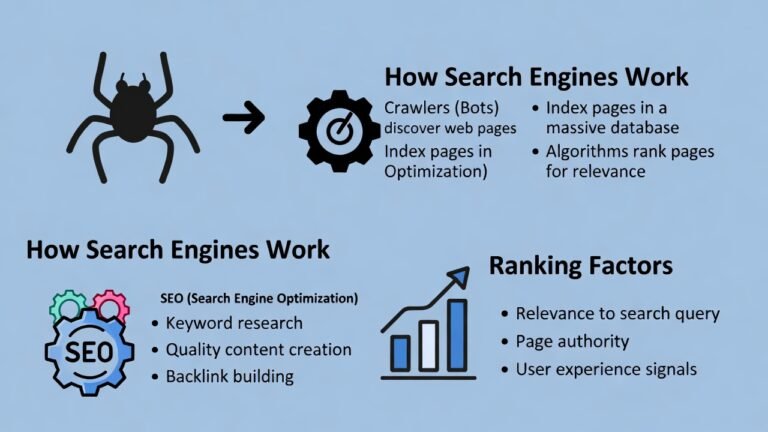
Crawling is discovery. Search engines use automated programs called crawlers (also called spiders or bots — Googlebot is Google’s) to browse the web and find pages.
Here’s how it works in practice. Google starts with a list of known URLs from previous crawls and sitemaps that website owners submit. The crawler visits those pages, reads the content, and follows the links it finds there. Those links lead to new pages, which contain more links, and so on. The web is essentially a giant graph, and crawling is how Google maps it.
A few things determine how often and how thoroughly Google crawls your site.
Crawl budget is the number of pages Google is willing to crawl on your site within a given timeframe. For large sites, this actually matters. If you have 50,000 pages and Google only crawls 10,000 of them per cycle, some of your content won’t get discovered quickly. For most small and medium sites, crawl budget isn’t a real constraint — Googlebot will get through everything fine.
Robots.txt is a file that lives at the root of your domain and tells crawlers which pages they’re allowed to visit. Block something in robots.txt and Google won’t crawl it. This is useful for keeping thin, duplicate, or private pages out of the crawl — but it’s also where a lot of SEO mistakes happen. Accidentally blocking your whole site with a misconfigured robots.txt is more common than it should be.
Internal links are how Google navigates your site. A page that nothing links to — an orphan page — is hard for crawlers to find. Even if it exists, if it’s not connected to anything, it might as well not be there. This is why internal linking is taken seriously in SEO: it’s not just for users, it’s the roadmap Googlebot follows.
Page speed and server response also affect crawling. If your server is slow to respond, crawlers move on and come back less often. A site that times out consistently gets crawled less.
One thing worth knowing: crawling and indexing are separate steps. Google can crawl a page and still decide not to index it. Don’t assume that because Googlebot visited your page, it made it into the index.
Stage 2: Indexing
Indexing is processing and storage. After a page is crawled, Google reads it, tries to understand what it’s about, and decides whether to add it to the index — the massive database of pages that search results are pulled from.
What Google looks at during indexing:
Content. The actual text on the page. Google reads it, identifies the main topics, and tries to understand the intent behind the page. It also reads alt text on images, captions, anchor text in links, and structured data markup if you’ve added it.
HTML structure. Title tags, heading tags (H1, H2, H3), and meta descriptions all feed into how Google categorizes a page. A clear H1 that matches what the page is actually about helps. A page with no headings and walls of unstructured text is harder to parse.
Canonical tags. If you have duplicate or near-duplicate pages (common on e-commerce sites with filtered URLs), canonical tags tell Google which version is the “real” one. Without them, Google might index the wrong version or split ranking signals across multiple URLs.
Noindex tags. If a page has a noindex meta tag, Google crawls it but doesn’t add it to the index. This is useful for thank-you pages, internal search results, admin pages — anything you don’t want showing up in search.
Content quality. Google makes a judgment call about whether a page is worth indexing at all. Thin pages, duplicate content, pages with no meaningful information — these might get crawled and then quietly left out of the index. Google has said explicitly that not every page on the internet gets indexed. It prioritizes pages that offer something distinct and useful.
You can check whether your pages are indexed by searching site:yourdomain.com in Google. What comes back is roughly what’s in the index. A page not showing up in that list is either not indexed yet, blocked, or Google decided against it.
Stage 3: Ranking
This is the part people spend the most time thinking about, and also the part Google is least transparent about.
Once a page is indexed, it becomes eligible to rank. When someone runs a search, Google goes through its index and pulls the pages it thinks best answer that query, then sorts them. The order is the ranking.
Google’s ranking algorithm has hundreds of factors. Nobody outside Google knows all of them. But the ones that are well-documented and consistently impactful:
Relevance
The most basic factor. Does your page actually address what the person searched for?
This goes beyond matching exact keywords. Google understands language well enough now that it can tell a page about “running shoes for flat feet” is relevant to someone searching “best shoes for overpronation,” even if those exact words don’t overlap. The underlying need is the same.
What this means practically: writing content that thoroughly covers a topic matters more than stuffing in keyword variations. Google is trying to match intent, not just vocabulary.
Backlinks
Links from other websites pointing to yours. This has been a core ranking signal since Google launched, and it still is.
The logic is straightforward: if many credible sites link to your page, that’s a signal that the page is worth something. A link from a respected industry publication carries more weight than ten links from random low-quality directories.
Quality matters far more than quantity. One link from a relevant, high-authority domain does more than 50 links from irrelevant or spammy sites. This is what Ahrefs’ Domain Rating and Moz’s Domain Authority try to measure — the cumulative strength of a site’s backlink profile.
Getting backlinks without actively building them is possible if your content is genuinely useful — people cite and link to good resources. But most sites at some point do deliberate link building: outreach, guest posts, digital PR. It’s slow work.
Page Experience
Google has formalized several user experience signals into what it calls Core Web Vitals. Three metrics:
LCP (Largest Contentful Paint): How long it takes for the main content of a page to load. Under 2.5 seconds is the target.
INP (Interaction to Next Paint): How quickly the page responds when a user interacts with it — clicks a button, taps a menu. Under 200 milliseconds is good.
CLS (Cumulative Layout Shift): Whether page elements jump around as the page loads. Images loading without set dimensions, ads popping in — these cause layout shift and hurt the score.
These aren’t the most powerful ranking factors, but they act as tiebreakers. Two pages of roughly equal quality and authority — the one with better page experience tends to win.
Content Quality and E-E-A-T
Google’s quality guidelines reference E-E-A-T: Experience, Expertise, Authoritativeness, and Trustworthiness. This isn’t a direct algorithm signal — it’s more of a framework that human quality raters use when evaluating whether Google’s results are any good. But it influences how Google thinks about content.
Experience means the content shows first-hand knowledge. A review written by someone who actually used the product reads differently than one assembled from other reviews.
Expertise means the author knows the subject. Medical content written by a doctor, legal content written by a lawyer — Google tries to assess whether the person behind the content has real knowledge.
Authoritativeness comes from reputation — what other sources say about your site and authors.
Trustworthiness covers accuracy, transparency, and whether the site gives users reason to believe it.
For practical purposes: author bylines matter, about pages matter, citing sources matters, and publishing accurate, well-researched content matters. Thin content written by nobody for no particular purpose is what Google’s quality systems are trying to filter out.
Search Intent Match
This one is underrated. Google doesn’t just rank pages that cover a topic — it ranks pages that match what searchers actually want to do with the information.
Search intent comes in four broad types:
Informational — the person wants to learn something. “How does compound interest work.” The right result is an explanation.
Navigational — the person wants to find a specific site. “Gmail login.” Google just sends them there.
Commercial — the person is researching before buying. “Best project management software.” The right result is a comparison or review, not a product page pushing one option.
Transactional — the person is ready to buy. “Buy Ahrefs subscription.” The right result is a pricing or sign-up page.
Mismatch your content type with intent and you won’t rank, regardless of quality. A blog post explaining what project management software is won’t rank for “buy project management software.” Google can read the room.
Freshness
For some queries, recency matters. News searches, anything with “2024” or “latest” in it, fast-moving topics — Google actively surfaces recent content for these. For evergreen topics (“how to tie a bowline knot”), freshness barely matters. The best explanation is the best explanation, whenever it was written.
Knowing which category your target keyword falls into matters. Updating old content regularly for freshness-sensitive topics is a legitimate strategy. Rewriting a perfectly good evergreen article every six months because you think Google wants “fresh” content is mostly wasted effort.
What This Means for SEO
The three stages chain together. If Google can’t crawl your page, it can’t index it. If it doesn’t index it, it can’t rank it. Problems at stage one or two make stage three irrelevant.
The most common technical failures: pages blocked in robots.txt accidentally, noindex tags left on from development, slow server response times eating crawl budget, orphan pages with no internal links pointing to them.
Once those are sorted, indexing quality becomes the question — is your content worth indexing? Then ranking factors take over.
People spend 90% of their SEO energy on ranking signals and almost none on crawlability or indexing. For established sites this is usually fine. For new sites, sites that have migrated recently, or sites with large page counts, checking the foundation first often explains why nothing is ranking despite “good” content.
The Part That Trips People Up
Search engines are not reading your page the way a person does. They’re running it through systems that extract signals: structure, links, language patterns, load speed, user behavior data. A page that looks beautiful to a human can be nearly invisible to a crawler if the fundamentals aren’t right.
That’s not an argument for gaming the system. It’s an argument for understanding what signals you’re sending. Good content that loads fast, links naturally throughout the site, earns real backlinks, and matches what searchers actually want — that’s what ranking looks like when it works.
The algorithm changes. The underlying logic doesn’t.
Beginner’s SEO Guide: https://searchenginebasics.org/